

Knowledge hub

Deposits

Deposits

A new and easy way to invest in term deposits and certificates of deposit!

Enjoy financial security by having a term deposit or certificate of deposit that allows you to invest your money for a rainy day. Pick the option that suits your financial goals and watch your money grow with time.

You can now top-up your balance or break a deposit according to your needs with a few taps. We’ve also added options that enable you to control the deposit and the certificate of deposit by the end of the time period.

Start now!

Step 1 of 2
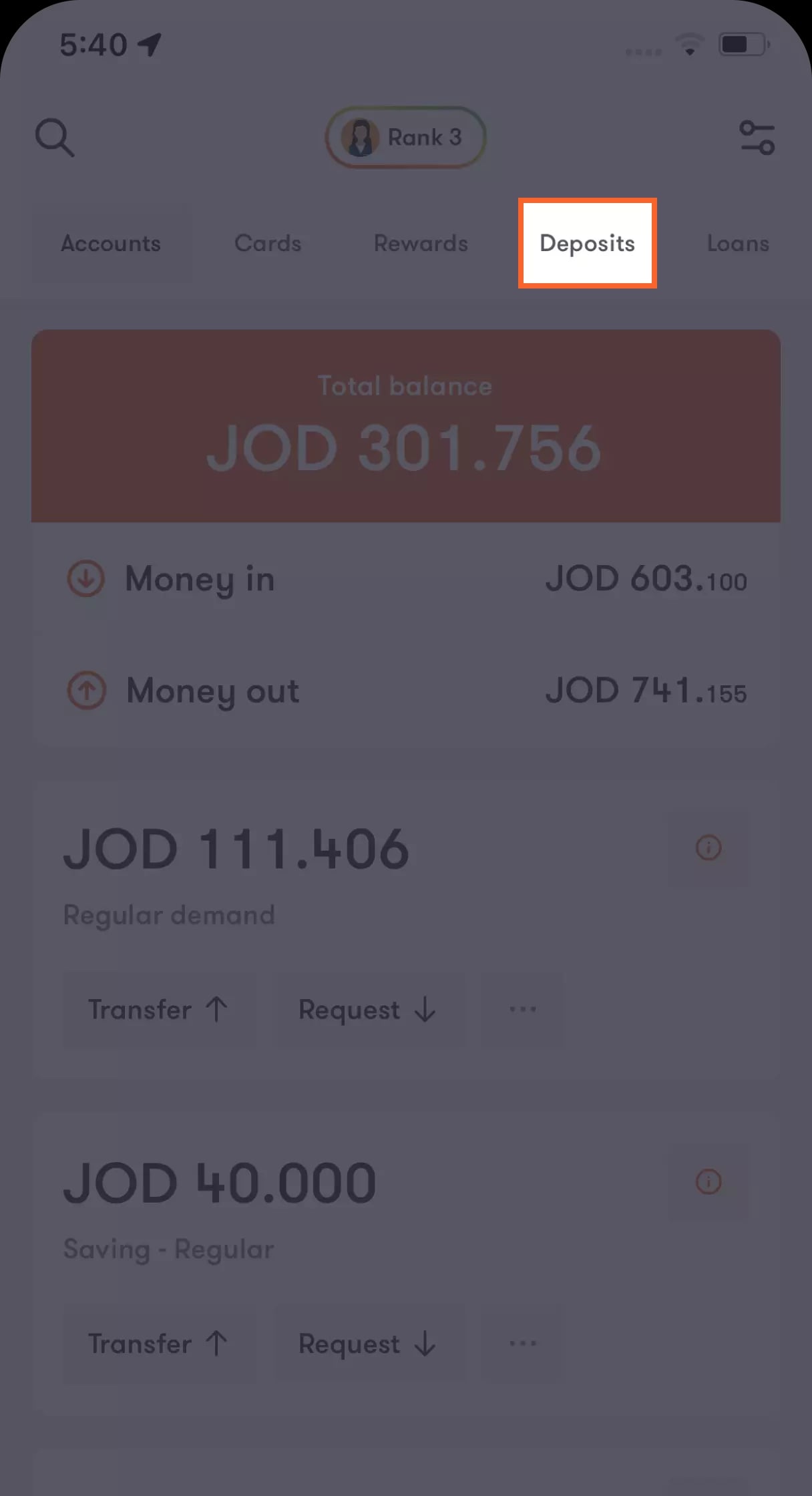
From the Home page tap "Deposits"
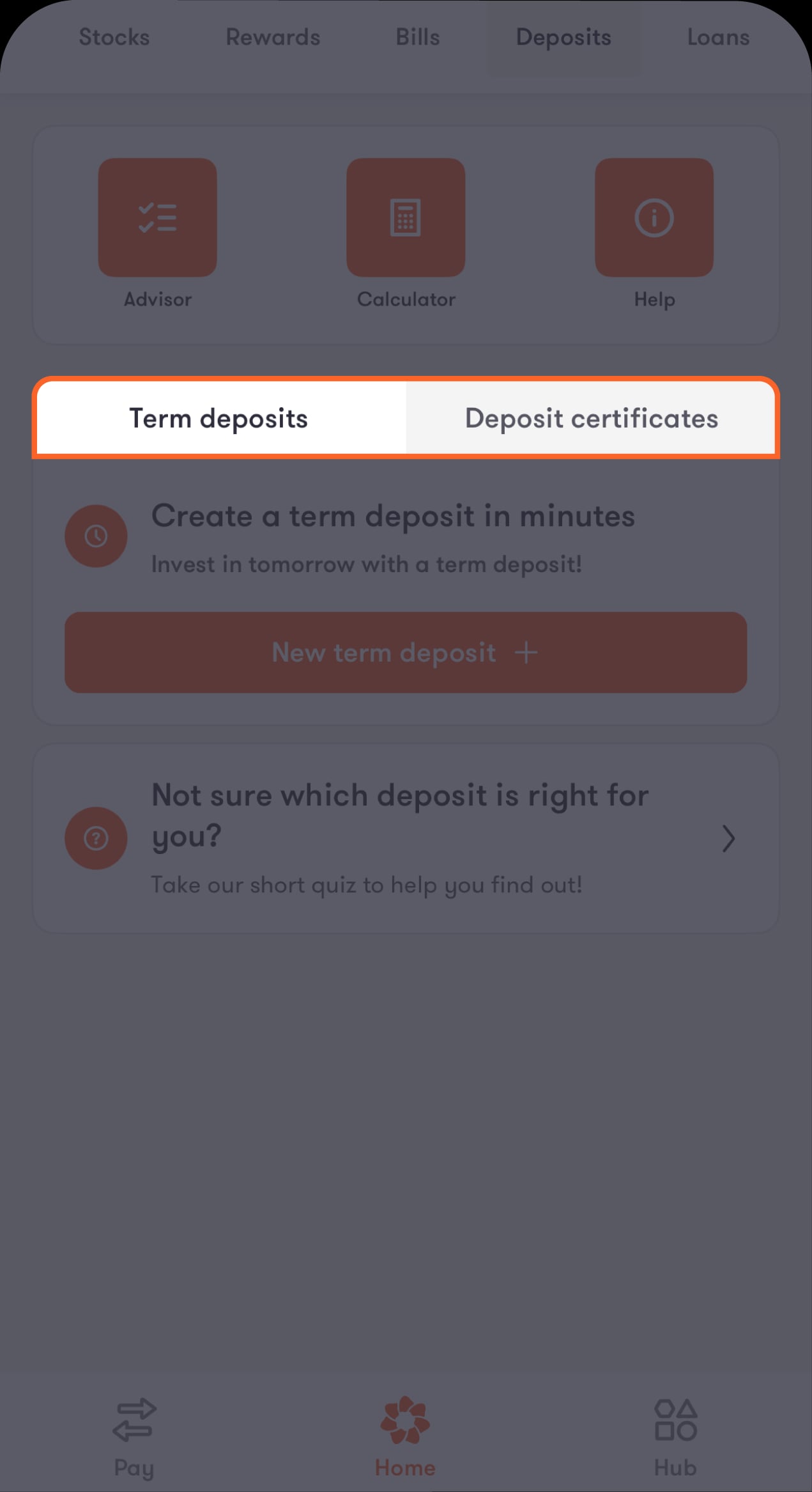
You will then be directed to a menu where you can pick between “Term deposits” and “Certificate of Deposit”.
3-en-deposits-3
Step 2 of 2
Choose your deposit type
From here you can also view your existing term deposits and certificate of deposits.
Deposits-02 En

Term Deposit

Step 1 of 7
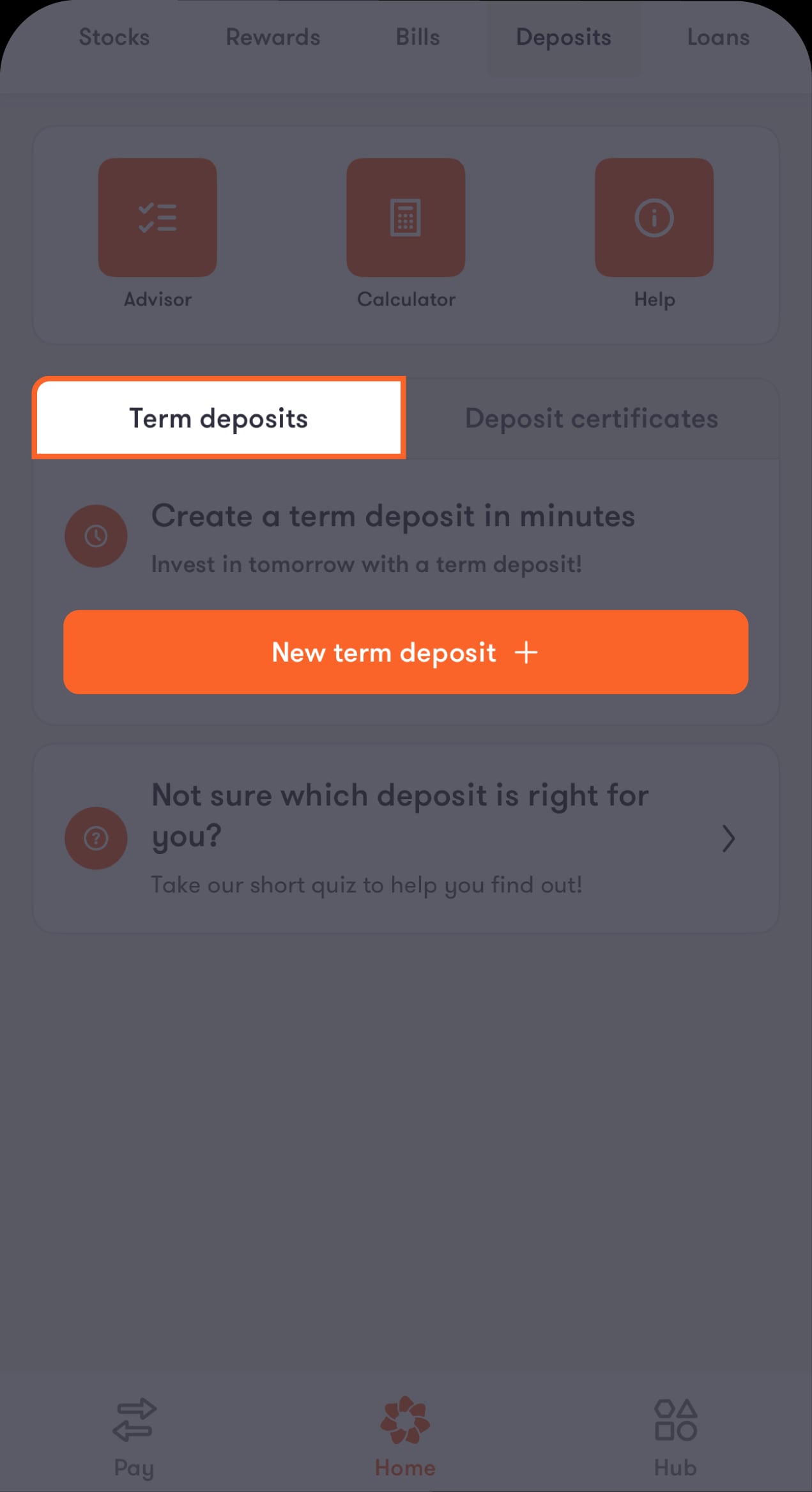
Tap on "New Term Deposit + "
After tapping on this button, you will be directed to “Open a term deposit” screen, where you will see a list of options you can choose from.

3-en-deposits-4
Step 2 of 7
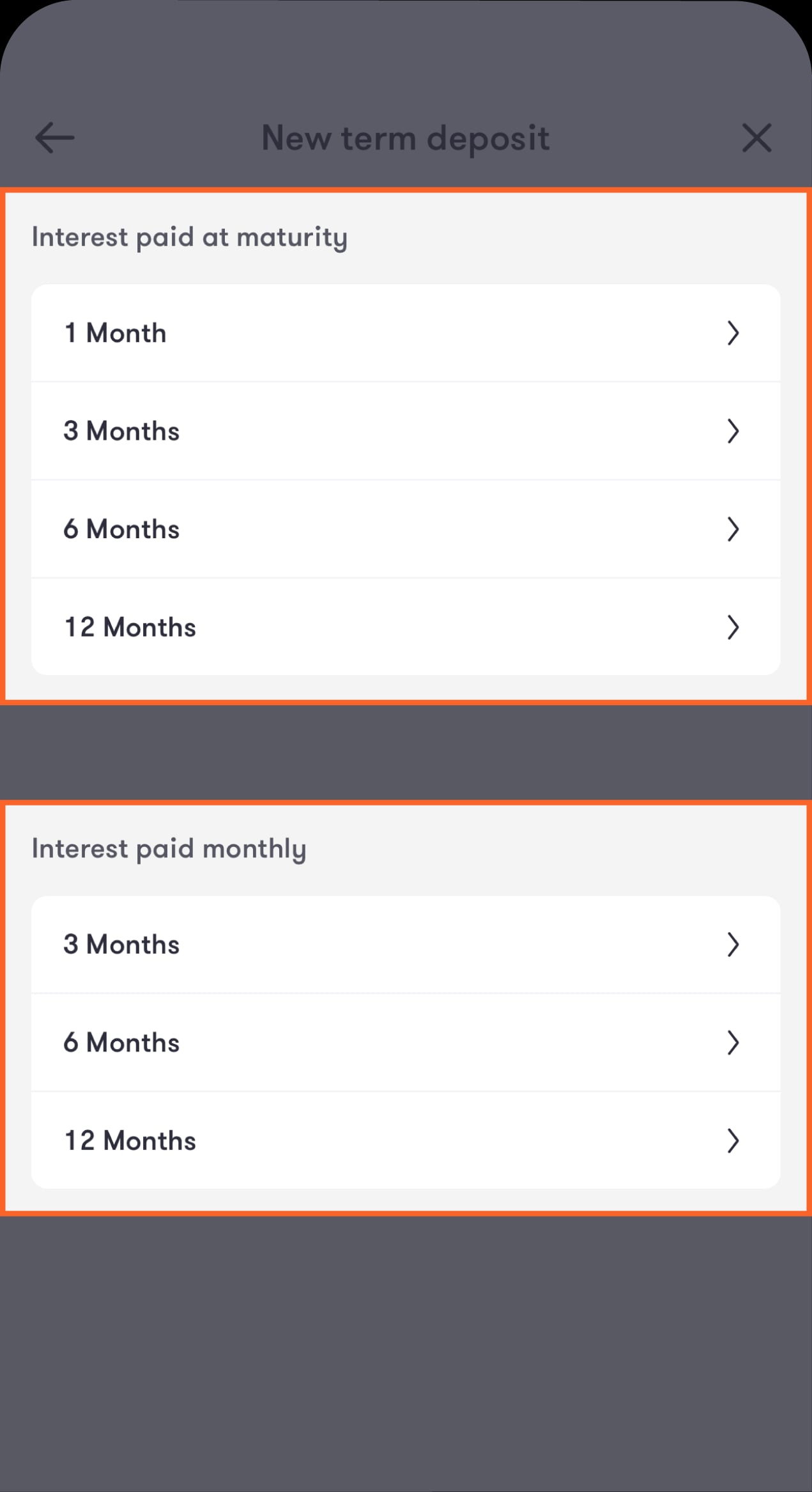
Choose the term deposit type that suits you
After tapping on one of the options, you will be taken directly to a screen containing the terms and conditions for the product you have chosen.
Term-02 En
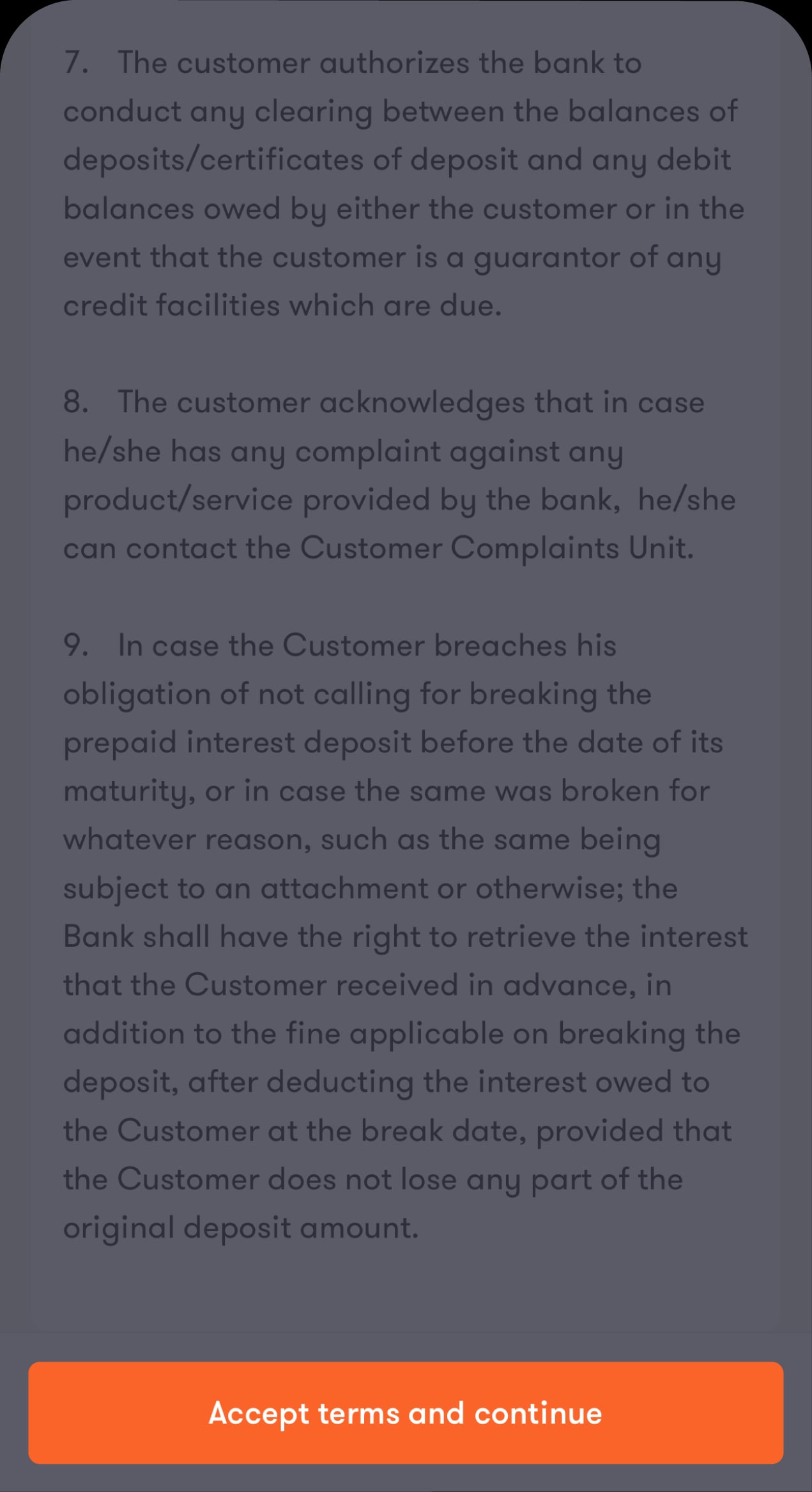
Step 3 of 7
After reviewing all the terms and conditions related to the product of your choice. Accept terms and continue button will be activated immediately. Tap on it to continue
Then you will go directly to the “Source Account” screen.
Term-03 En
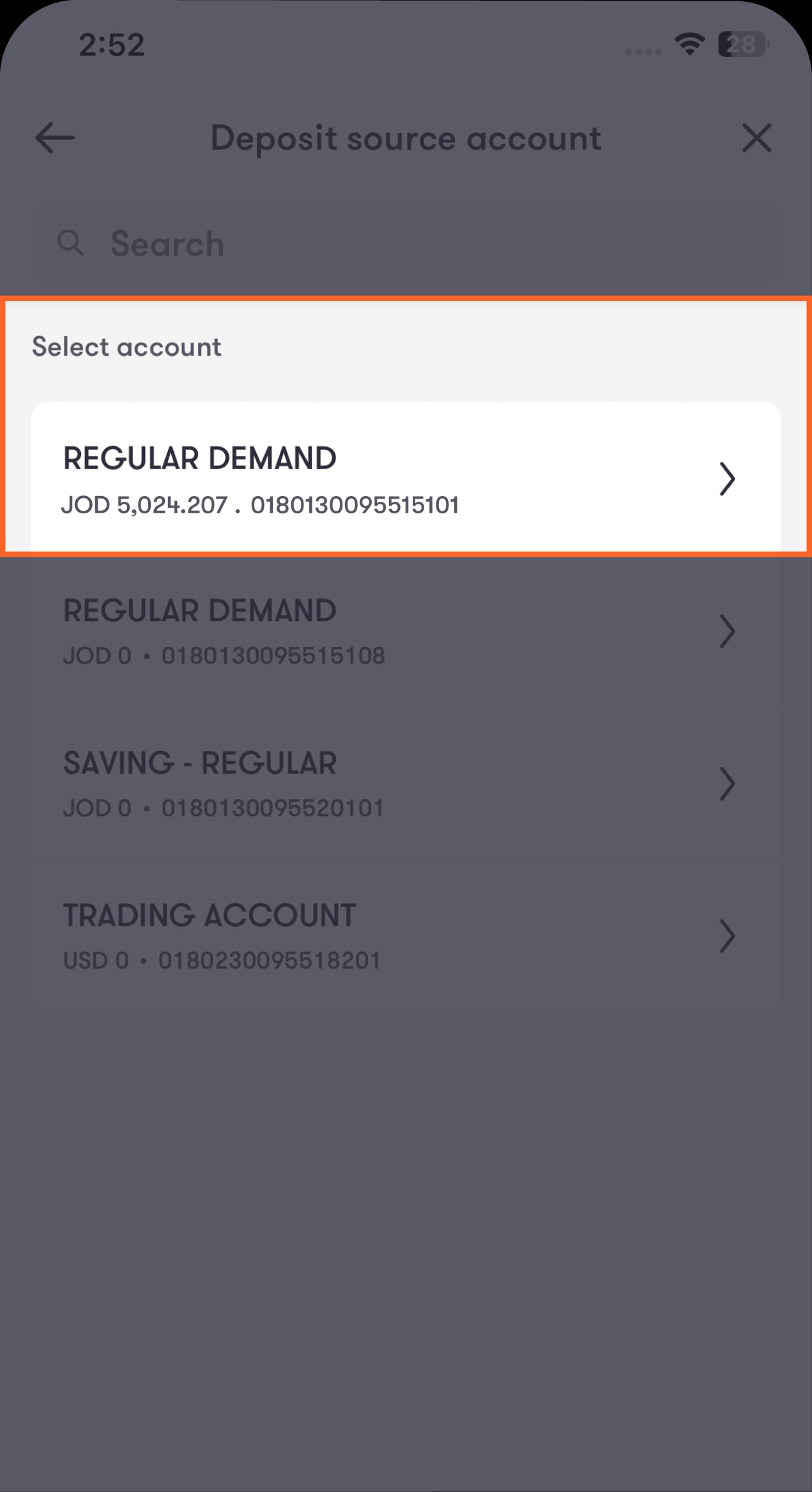
Step 4 of 7
Choose the account from which you want to withdraw the deposit amount
You will then be directed to the “Enter deposit amount” screen.
Term-04 En
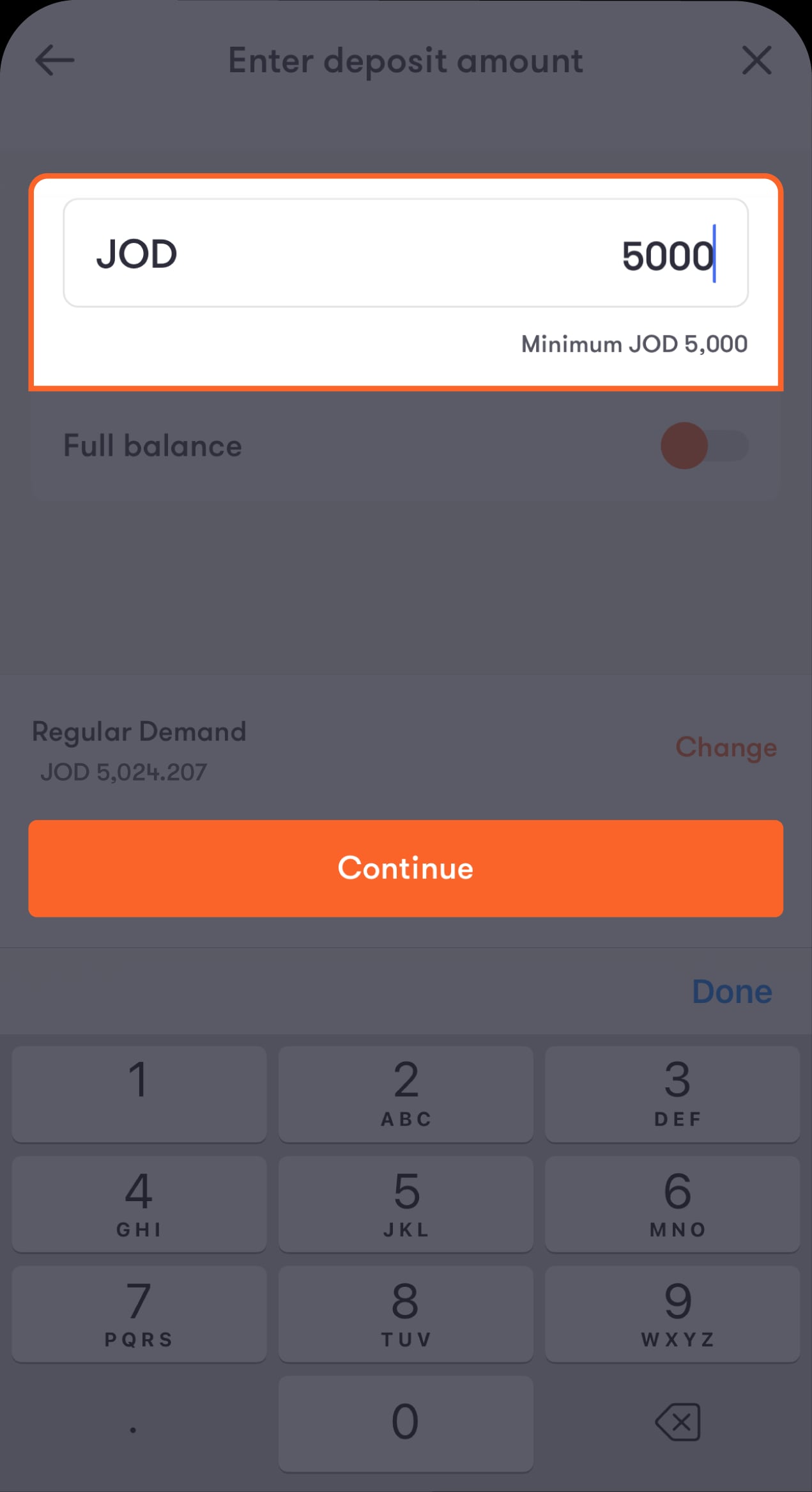
Step 5 of 7
Enter the amount you want to deposit, then click the Continue button
Then you will go directly to the “Renewal options” screen, which contains several options, from which you can choose what suits you best.
Term-05 En
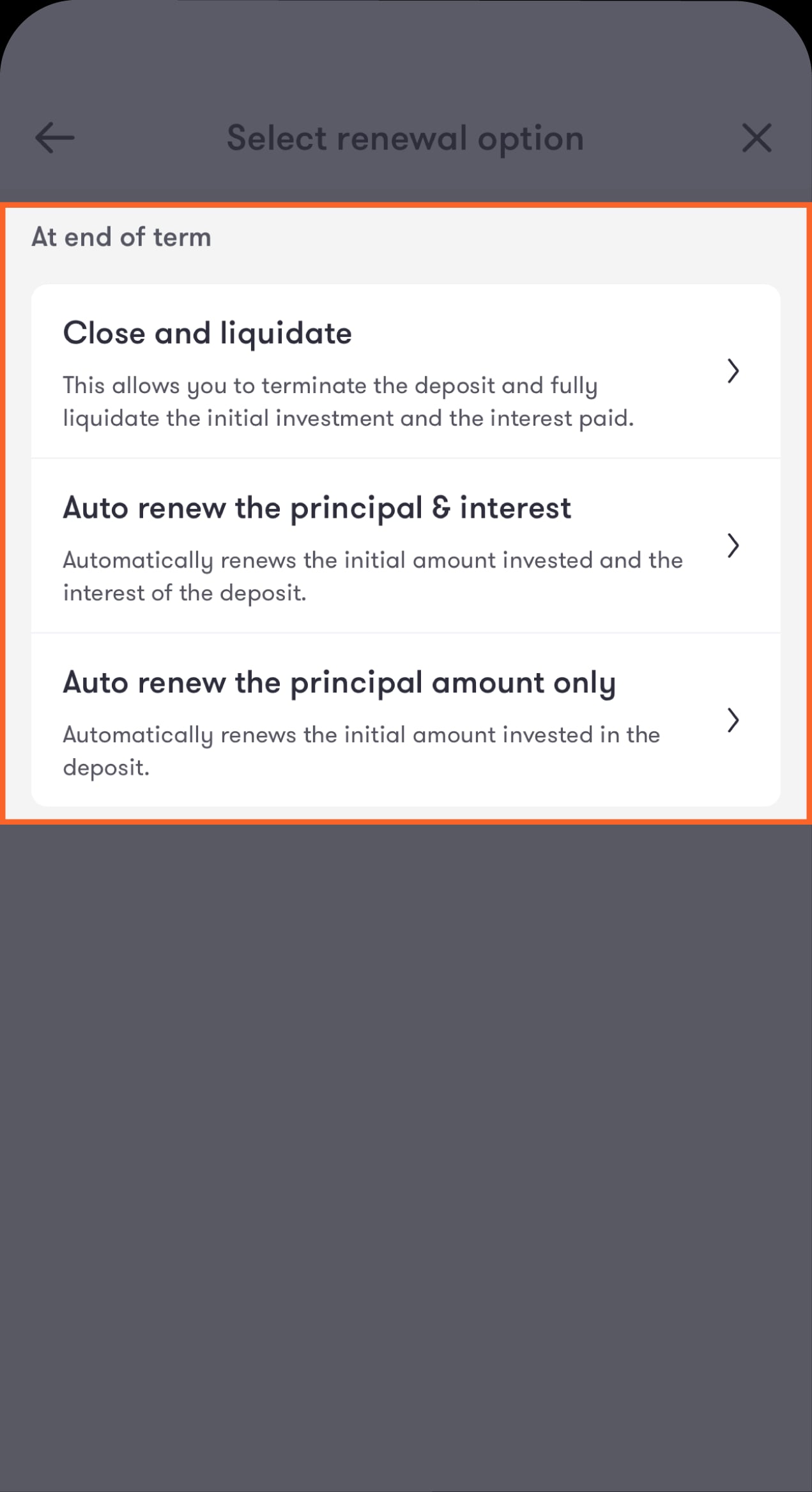
Step 6 of 7
Choose what suits you from the list.
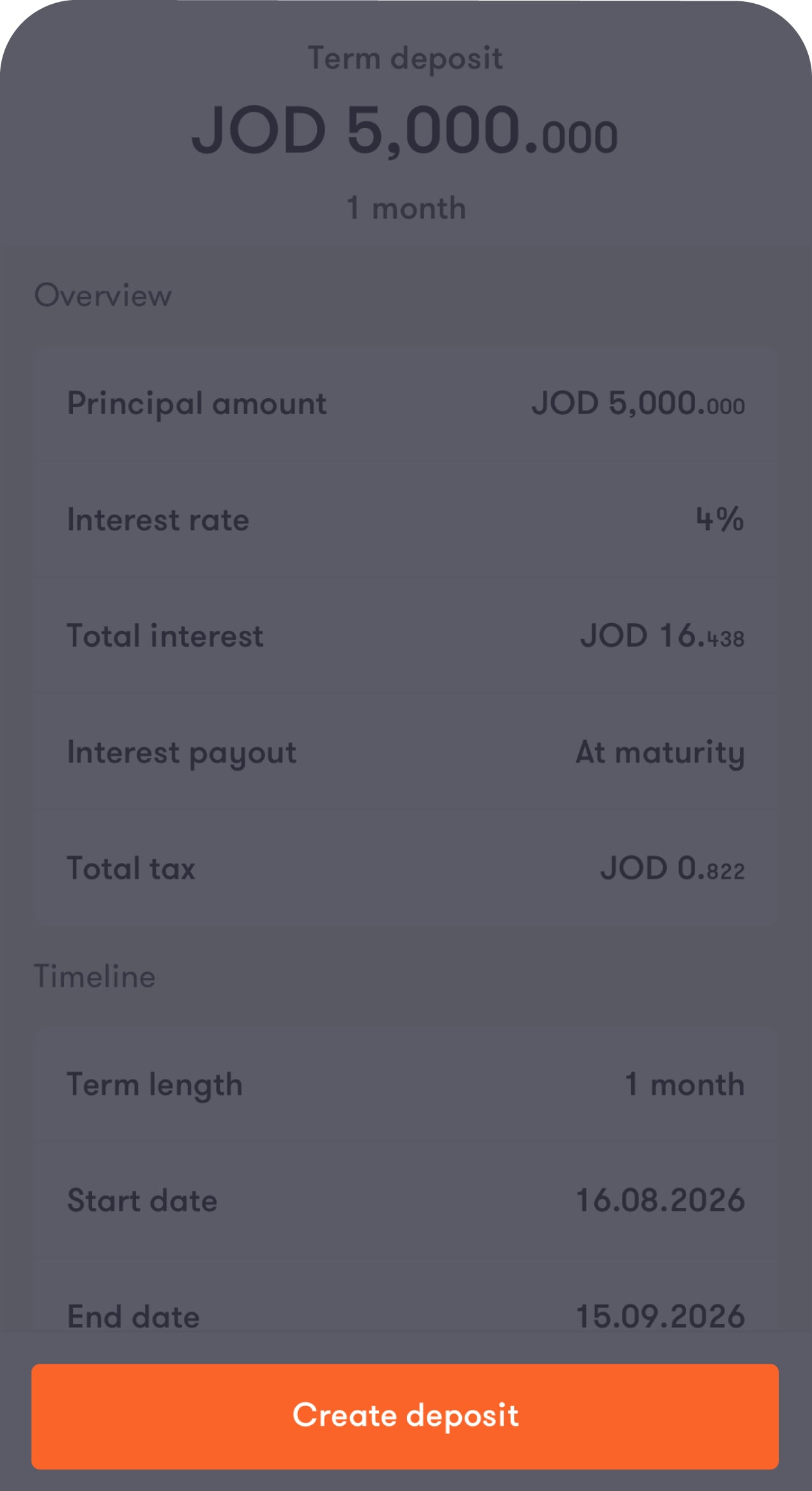
You will then proceed directly to the “Review deposit” screen, which contains all the details of your term deposit.
Term-06 En
Step 7 of 7
Click the Create a deposit button
You will be directed to the “Transaction completion” screen.
10en

Certificate of Deposit

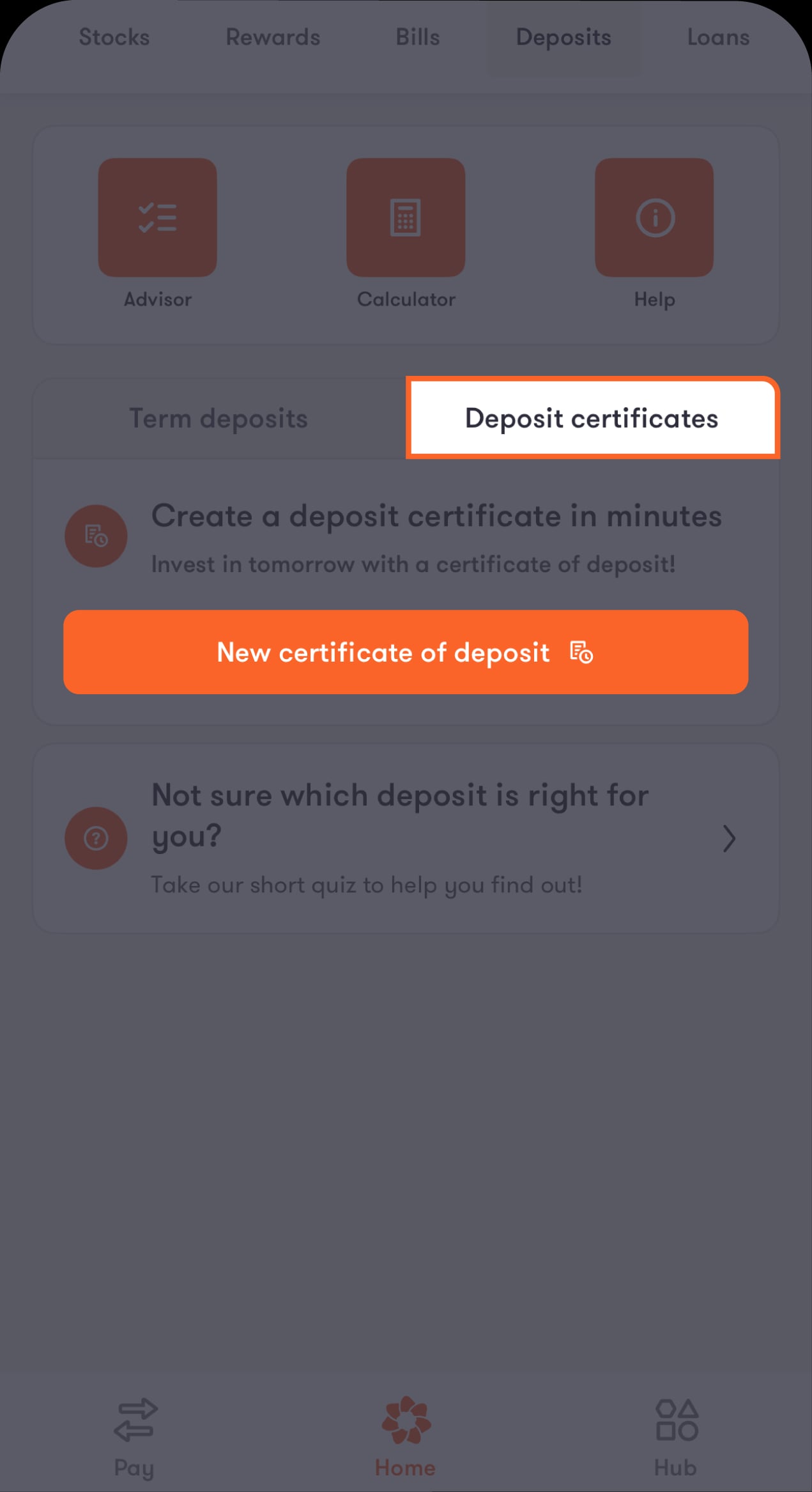
Step 1 of 7
Click on the “New Certificate of Deposit” button
After tapping on this button, you will go directly to “New Certificate of Deposit” screen, where you will be presented with a list of periods that you can choose from that the deposit will be valid for.
Certificate-01 En
Step 2 of 7
Choose the certificate's period
After tapping on one of the options, you will be directed to a screen containing the terms and conditions for the product you have chosen.
Certificate-02 En
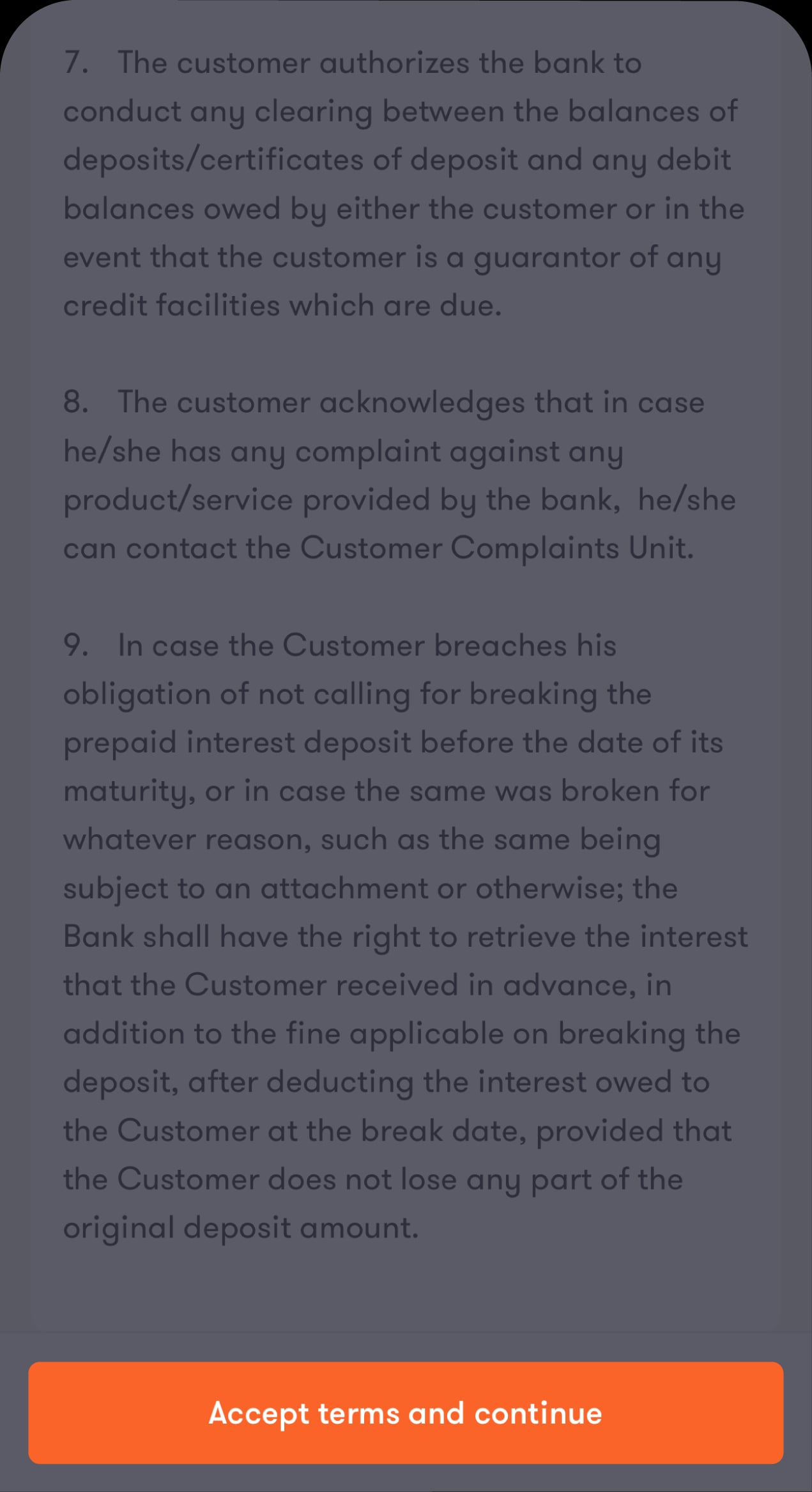
Step 3 of 7
Read the terms and conditions carefully. To accept, tap "Accept terms & continue"
Then you will go directly to the “Source account” screen.
Certificate-03 En
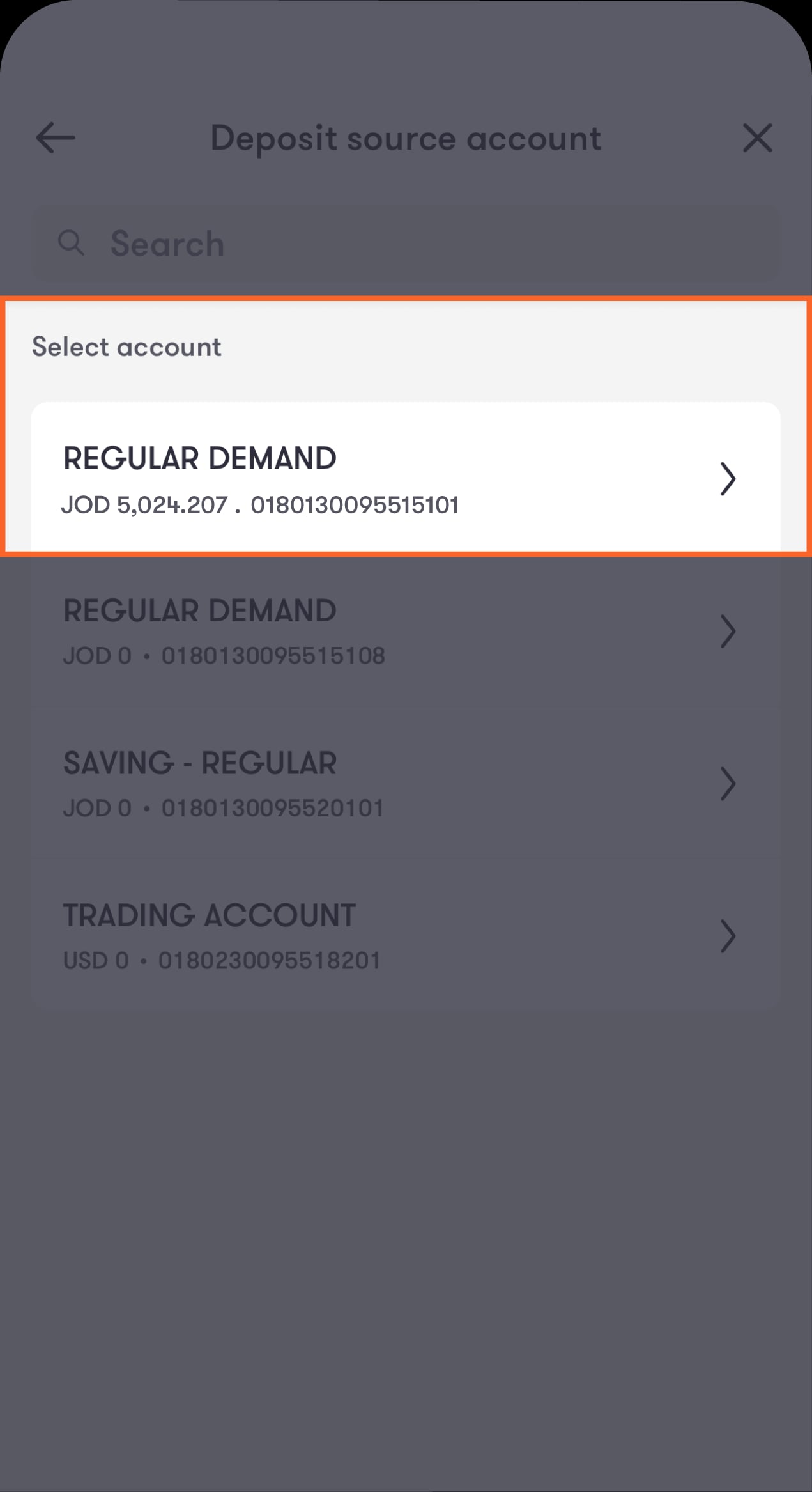
Step 4 of 7
Choose the account from which you want to withdraw the Certificate of Deposit amount.
You will then go directly to enter the deposit amount.
Certificate-04 En
Step 5 of 7
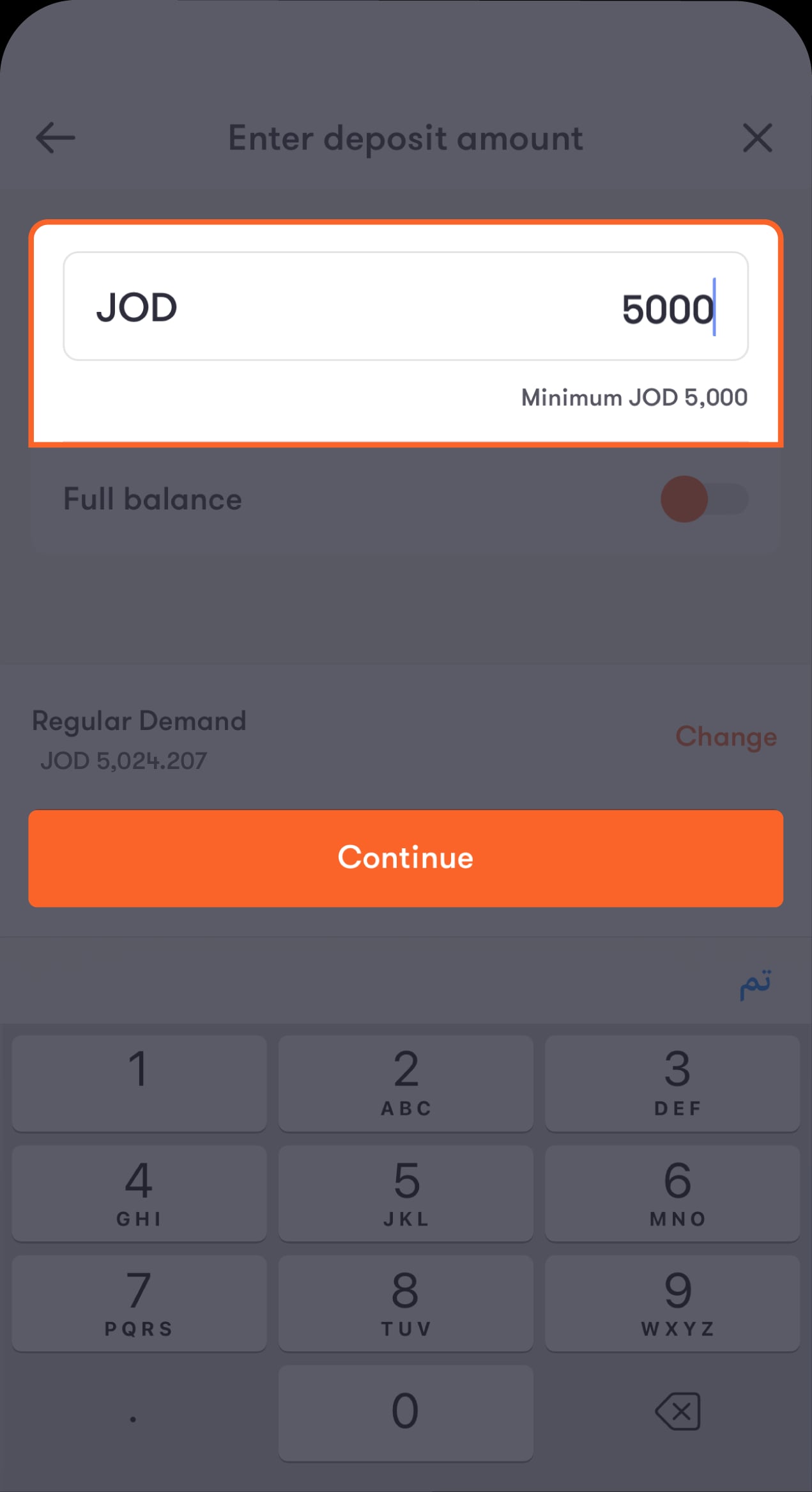
Choose the deposit amount you want.
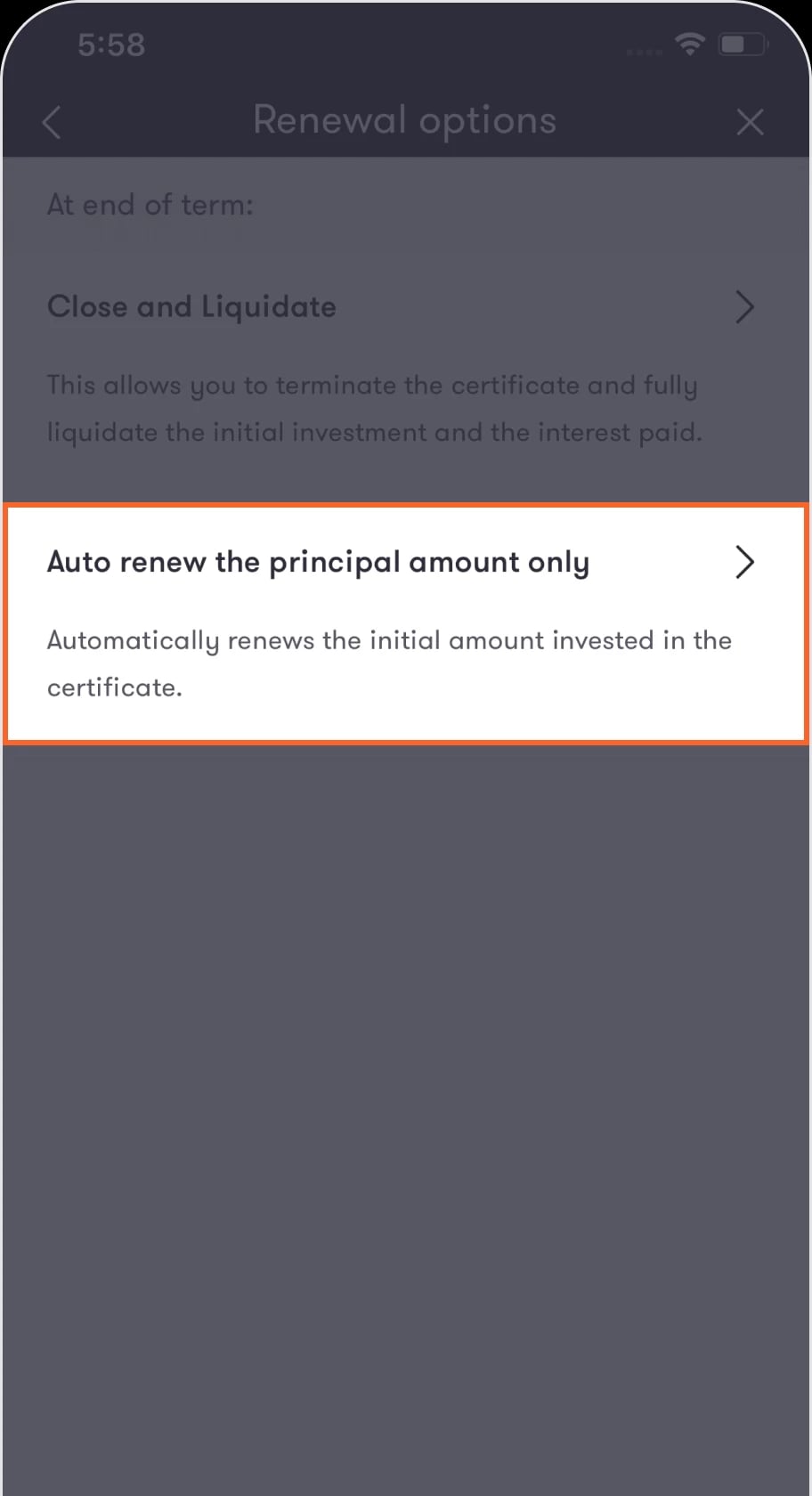
Bearing in mind that the minimum deposit is 5,000 JOD or the equivalent in USD, GBP and Euro. You will then be directed to the “Select renewal option” screen, where you can decide what happens to the deposit at the end of the term.
Certificate-05 En
Step 6 of 7
Choose what suits you from the list.
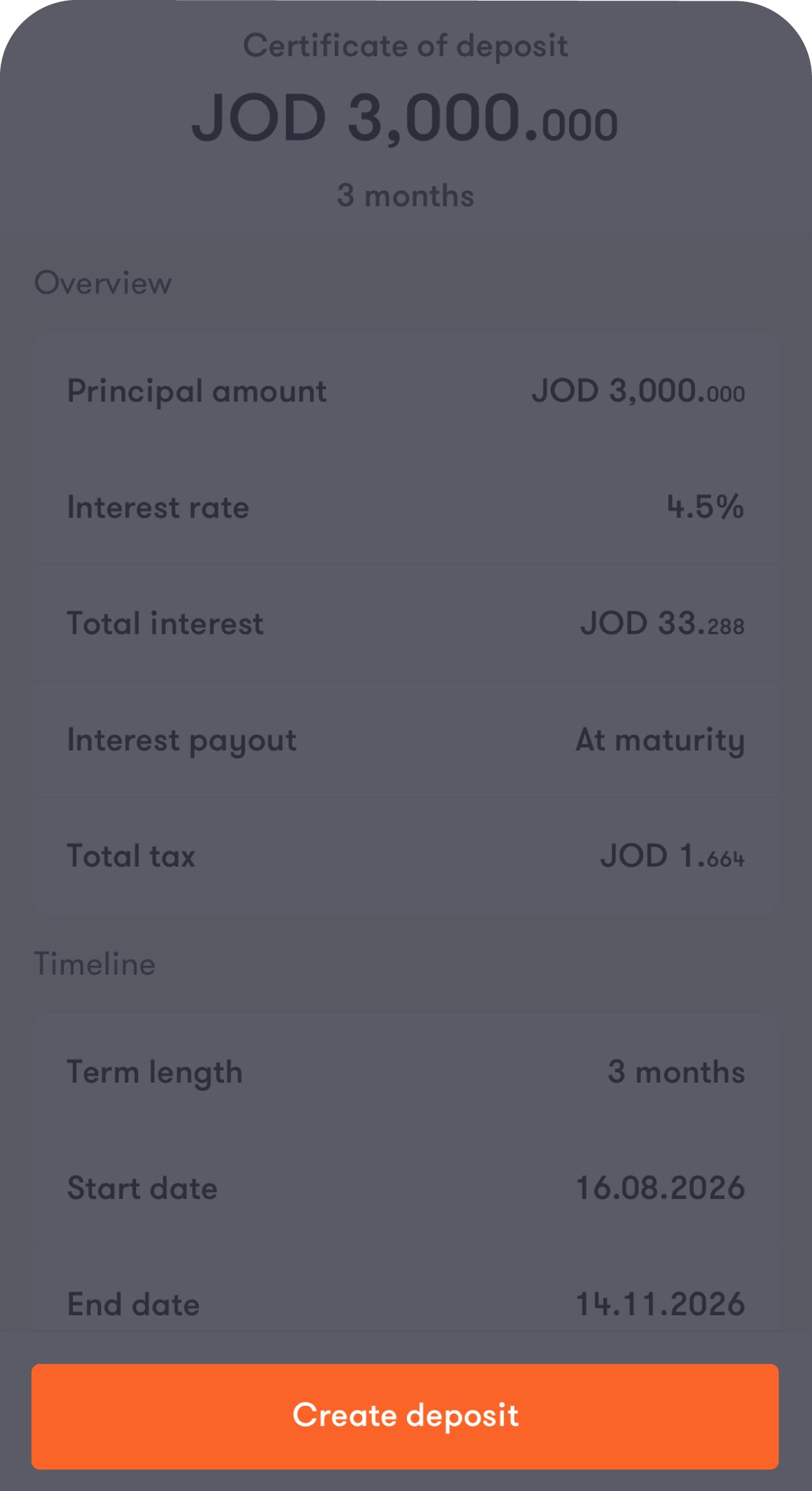
You will then proceed directly to the “Review deposit” screen, which contains all the details of the deposit.
17en
Step 7 of 7
Click "Create a deposit"
You will then move directly to the “Transaction completion” screen.
18en

Read the FAQ’s

What is a deposit?

A deposit is money you place in a bank account to keep it safe while earning interest to help it grow. Deposits are “locked” for specific periods, meaning you agree not to withdraw the money during that time in return for earning interest. This makes it a reliable option for building your savings and achieving your financial goals.

What are the benefits of opening a deposit?

A deposit is a safe way to grow your money. Unlike other investments, it guarantees a return and protects your original deposit, so there’s no risk of losing what you put in. It’s simple to understand, with clear terms, and easy to manage, making it great if you want stability and peace of mind with your savings.

Which currencies can I open a term deposit or certificate of deposit in?

You can open a term deposit with interest paid at maturity in the following 6 currencies:

1. Jordanian Dinar (JOD)
2. US Dollar (USD)
3. British Pound (GBP)
4. Canadian Dollar (CAD)
5. Australian Dollar (AUD)
6. Euro (EUR)

You can open a term deposit with interest paid monthly in the following currency:

1. Jordanian Dinar (JOD)

You can open a certificate of deposit in the following 3 currencies:
1. Jordanian Dinar (JOD)
2. US Dollar (USD)
3. British Pound (GBP)

What is the difference between a term deposit and certificate of deposit?

A term deposit is a short-term investment with lower interest rates but offers flexibility to access your money if needed. On the other hand, a certificate of deposit has higher interest rates and fixed maturity dates, meaning access to your money is more limited throughout the term. Your choice will depend on whether you prefer flexibility or higher returns.

How is the interest rate for deposits calculated?

The interest rate depends on several factors, such as the term, type, and amount of the deposit. And it’s represented as an annual percentage. You can find the latest deposit interest rates here.

What is the difference between receiving interest payments monthly and receiving them at maturity?

Monthly interest payments give you a steady income during the term, which is helpful if you need regular cash flow. Interest paid at maturity is accumulated and paid as a lump sum at the end of the term, making it perfect if you can wait for a larger reward.

Can I top up the principal amount of my term deposit or certificate of deposit midterm?

You can top up your term deposit by following these steps:

1. Tap on “Deposits” from the bar at the top of the main screen
You will be directed to a screen where you can toggle between term deposits and certificates of deposit and view all your deposits.

2. Select the deposit you want to top up
You will be directed to a screen showing your deposit’s details, with 2 options: “Liquidate deposit” and “Top up +”.

3. Tap on “Top up +”
Enter the amount you want to add to your deposit, then tap on “Continue”.

4. Review the updated details of the deposit, then tap on “Top up deposit”
A screen will appear to confirm the successful top-up of your deposit, with an option to share the updated details with your contacts or on social media.

A certificate of deposit can’t be topped up.

Can I amend the renewal type of my term deposit or certificate of deposit midterm?

You can amend the renewal type of your term deposit or certificate of deposit midterm, but this can only be done by visiting one of our branches.

For term deposits with interest paid at maturity, you have 3 renewal options:
1. Fully withdraw the deposit, including both the principal amount and the interest earned, to your account.
2. Automatically reinvest both the principal amount and the interest earned for a new term.
3. Reinvest only the principal amount for a new term, while the interest earned is deposited into your account.

For term deposits with interest paid monthly, you have 2 renewal options:
1. Fully withdraw the deposit, including both the principal amount and the interest earned, to your account.
2. Reinvest only the principal amount for a new term, while the interest earned is deposited into your account.

For certificates of deposit, you have 2 renewal options:
1. Fully withdraw the deposit, including both the principal amount and the interest earned, to your account.
2. Reinvest only the principal amount for a new term, while the interest earned is deposited into your account.

Can I break my term deposit or certificate of deposit midterm?

You can break a term deposit and choose to either partially or fully liquidate it through our app.

You can break a certificate of deposit through our app, but unlike term deposits, you can only fully liquidate the deposit.

Note that penalties will apply if you partially or fully liquidate the deposit before its maturity, as outlined in the bank’s terms and conditions.

Published:
10 September 2020
Share:
Was this article helpful?
We’re always looking to improve, and your feedback will help us shape our future content so we can be as useful to you as we possibly can.

Related products
Credit Card Request
Credit Card Request
Apply for a credit card without visiting a branch!
Cards
Read more
Generate Advice
Generate Advice
Master the art of effortless advice issuance with our step-by-step guide!
Statement
Read more
Multi-Currency Prepaid Card
Carry the world's currencies in your pocket!
Cards
Read more